Comparison
Best Loom Alternatives in 2026: Why Teams Are Switching
Last updated: March 2026 · 8 min read
Loom pioneered async video for teams. The idea was simple: record your screen, share a link, and skip the meeting. It worked. Millions of people adopted it.
But in 2026, Loom's value proposition has gotten harder to justify. After the Atlassian acquisition, pricing shifted to $15/user/month (Business) or $20/user/month for AI features. Creator Lite seats were eliminated, meaning every team member now costs the full per-seat price. For a team of 20, that's $3,600-$4,800/year for what remains a fairly basic recording tool.
The bigger issue is quality. Loom has started adding AI-powered zoom and manual spotlight tools, but the results are basic: cursor-following zoom that doesn't understand what you're interacting with, and shapes you have to draw yourself. Since most Loom videos are shared internally, there's been little incentive to go further. What you record is still mostly what you get.
We're the team behind Recordio, so we're biased. But we built it specifically to solve this: studio-quality recordings that are just as easy to share, without the per-seat pricing. Here's why teams are switching.
The Quality Gap: Why Loom Videos Look Like Loom Videos
You've seen it before. Someone shares a Loom and it's a flat screen recording with a webcam bubble, visible browser clutter, and no visual hierarchy telling the viewer where to look. It gets the job done internally, but try sending that to a prospect, a client, or including it in documentation, and it falls flat.
Recordio changes this completely. Every recording is automatically enhanced with DOM-aware auto-zoom (it reads your page structure and zooms into the right element), auto-spotlight that highlights what you're interacting with using a 3D elevation effect, and a simplified Chrome toolbar that hides your messy bookmarks and 47 open tabs. The result is a studio-quality video, produced automatically, with zero manual editing.
Here's what the difference looks like:
See the Difference
Same recording. One click. Studio-quality output.
The "before" is essentially what Loom gives you. The "after" is what Recordio produces from the exact same recording session, with zero manual edits. Auto-zoom, auto-spotlight, device frames, background, and a clean toolbar, all applied automatically.
Recordio: Loom's Shareability + Studio Quality
Recordio combines the sharing workflow people love about Loom with the production quality that Loom has never offered. Here's what makes it a real alternative:
Shareable Links with Viewership Analytics
Just like Loom, you can share a link and anyone can watch without signing up. But Recordio also gives you viewership analytics: total view count and average watch time, so you know if people actually watched your video. Permissions (controlling who can view) are coming soon, completing the Loom replacement.
Studio-Quality Output, Zero Effort
This is where Recordio pulls ahead of everything else. Because it runs as a Chrome extension, it reads the DOM structure of whatever web app you're recording. It knows what you're clicking on, what you're hovering over, and what deserves the viewer's attention. That page awareness powers:
- DOM-Aware Auto Zoom: Automatically zooms into the exact UI element you're interacting with. No jittery cursor-following. Every auto-generated zoom is fully editable through a keyframe system.
- Auto Spotlight (3D Card Elevation): When you hover over a card or interactive element, Recordio lifts it from the page with a 3D elevation effect while dimming the background. Completely automatic.
- Simplified Chrome Toolbar: Hides your messy bookmarks, open tabs, and extensions. Shows a clean URL bar with shortened links.
- Device Frame Wrapping: Wraps your recording in a MacBook Pro or MacBook Air frame, making product demos look polished.
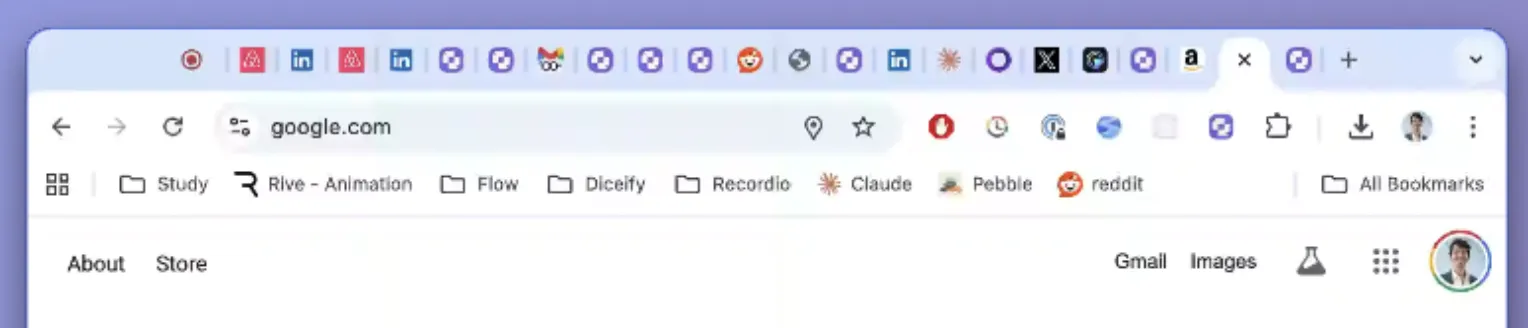 BEFORE
 AFTER
AFTERSmart AutoCut
Loom recordings are often full of dead air: moments where you're thinking about what to say or navigating to the next thing. Recordio's AutoCut removes that silence automatically. It tracks both your voice and your interactions, so it won't cut footage where you're quietly typing or clicking through something important.
Other Features Loom Doesn't Have
- Auto Captions with Word-by-Word Highlighting: Generated locally, fully editable, with individual words highlighting in sync with your speech.
- Dynamic Camera Placement: Set your webcam to full-screen for intros, then have it automatically return to a corner. Auto-shrinks when you zoom into content.
- Camera Feathering: Softens webcam feed edges so it blends naturally rather than looking pasted on.
- Custom Backgrounds: Swap your recording background or upload your own.
- Local Processing: Everything runs in your browser. Transcription uses on-device Whisper models. Your recordings never touch a server during editing (unlike Loom, which is cloud-only).
- Cross-Platform: Works on Mac, Windows, Linux, and ChromeOS.
Cost: Built to Be Cheaper
Because Recordio runs entirely in your browser, there's no heavy cloud infrastructure behind every recording. Videos are only uploaded if you choose to share them via a link. That means Recordio can offer significantly lower pricing than tools like Loom that process everything server-side. For team pricing, reach out to [email protected].
What About Screen Studio?
Screen Studio is a macOS-only desktop app that produces polished recordings with cursor-based auto-zoom and motion blur. It's a solid tool for making demos look good. But at $108/yr with no free tier, it's more expensive than both Recordio and Loom. More importantly, it's not a Loom replacement: Screen Studio has no shared video library, no viewership analytics, and no team collaboration features. It's a recording and editing tool, not an async communication platform.
Recordio vs Loom: Feature Comparison
| Feature | Recordio | Loom |
|---|---|---|
| Shareable Links | Yes, with viewership analytics | Yes |
| Auto Zoom | DOM-aware (reads page structure) | Cursor-based (AI) |
| Auto Zoom Editable | Yes (keyframe system) | No |
| Auto Spotlight | Automatic, 3D elevation | Manual shapes (circles, arrows) |
| Device Frames | Yes | No |
| Smart AutoCut | Voice + interaction aware | No |
| Simplified Toolbar | Yes | No |
| Auto Captions | Yes (local, 99 languages) | Yes (cloud, 50+ languages) |
| Word-by-Word Highlighting | Yes | No |
| Custom Backgrounds | Yes | Yes |
| Local Processing | Yes (fully in-browser) | No (cloud-only) |
| Library Management | Coming soon | Yes |
| Permissions | Coming soon | Yes |
The Bottom Line
Loom set the standard for async video at work. But in 2026, "record your screen and share a link" is table stakes. What Loom hasn't done is make recordings look good, and that's where Recordio wins.
You get the same shareable links and viewership analytics, but your videos come out looking like they were produced by a design team. Auto-zoom that actually understands what you're showing, spotlight effects that guide the viewer's eye, a clean toolbar, device frames, and smart silence removal. All of it automatic.
If your team records web apps, documents processes, or creates product demos, Recordio is the Loom alternative worth trying. The free tier and 7-day Pro trial make it risk-free to see the difference for yourself.