Comparison
Best Screen Recorders in 2026: An Honest Comparison
Last updated: March 2026 · 10 min read
The screen recording space has evolved dramatically. What started as simple screen capture tools have become full post-production studios, adding auto-zoom, spotlight effects, captions, and more, all without touching a video editor. Tools like Screen Studio and Focusee have been around longer, but a newcomer, Recordio, is challenging the status quo with a fundamentally different approach.
We're the team behind Recordio, so yes, we're biased. But we're also builders who obsess over this space daily. We'll lay out the facts, show you where each tool shines, and let you decide.
1. Recordio: The Clear Winner for Web App Recordings
Platforms: Chrome Extension (Mac, Windows, Linux, ChromeOS)
Pricing: $4/mo billed annually ($48/yr) · $15/mo monthly · Free tier + 7-day Pro trial (no credit card)
Recordio takes a fundamentally different approach to screen recording. Instead of running as a desktop app that watches your pixels, it runs inside your browser as a Chrome extension. That distinction sounds small, but it unlocks a lot.
Why the Browser Extension Approach Matters
Because Recordio lives inside Chrome, it doesn't just see your screen. It understands the DOM structure of whatever web app you're using. It doesn't read your text or content; it reads the layout: the hierarchy of elements on the page, how they're sized, and how they relate to each other. It knows when you're hovering over a card. It knows when you're typing into an input field, and how large that field is. It can distinguish a dropdown menu from a modal from a sidebar.
This page-awareness powers two features that no other screen recorder can match:
DOM-Aware Auto Zoom
Most screen recorders apply zoom by following your mouse cursor. The result is jittery, imprecise, and often requires manual cleanup. What makes it worse is that the auto-zoom these tools generate isn't editable. If a zoom doesn't look right, you have to delete it entirely and reapply it manually. That's because cursor-based zoom follows a mouse path rather than working in a keyframe system.
Recordio's zoom is different. It reads the HTML structure of the page and targets the actual UI element you're interacting with. The result is smooth, precise zooms that frame exactly the right thing, every time. And because it uses a keyframe system, every auto-generated zoom is fully editable: you can adjust timing, position, and framing without starting over.
For web app recordings (product demos, onboarding walkthroughs, bug reports), this is a no-brainer. You press record, do your thing, and the zoom just works. No post-editing required.
Auto Spotlight (3D Card Elevation)
This is something only Recordio does. When you hover over a card or interactive element, Recordio detects it, makes it visually "pop" from the page by floating it forward with a 3D elevation effect while dimming the background. It's completely automatic and makes your recordings look like they were produced by a design team.
See the Difference
Same recording. One click. Studio-quality output.
Features Only Recordio Has
Beyond the DOM-aware intelligence, Recordio packs several features you won't find anywhere else:
Device Frame Wrapping
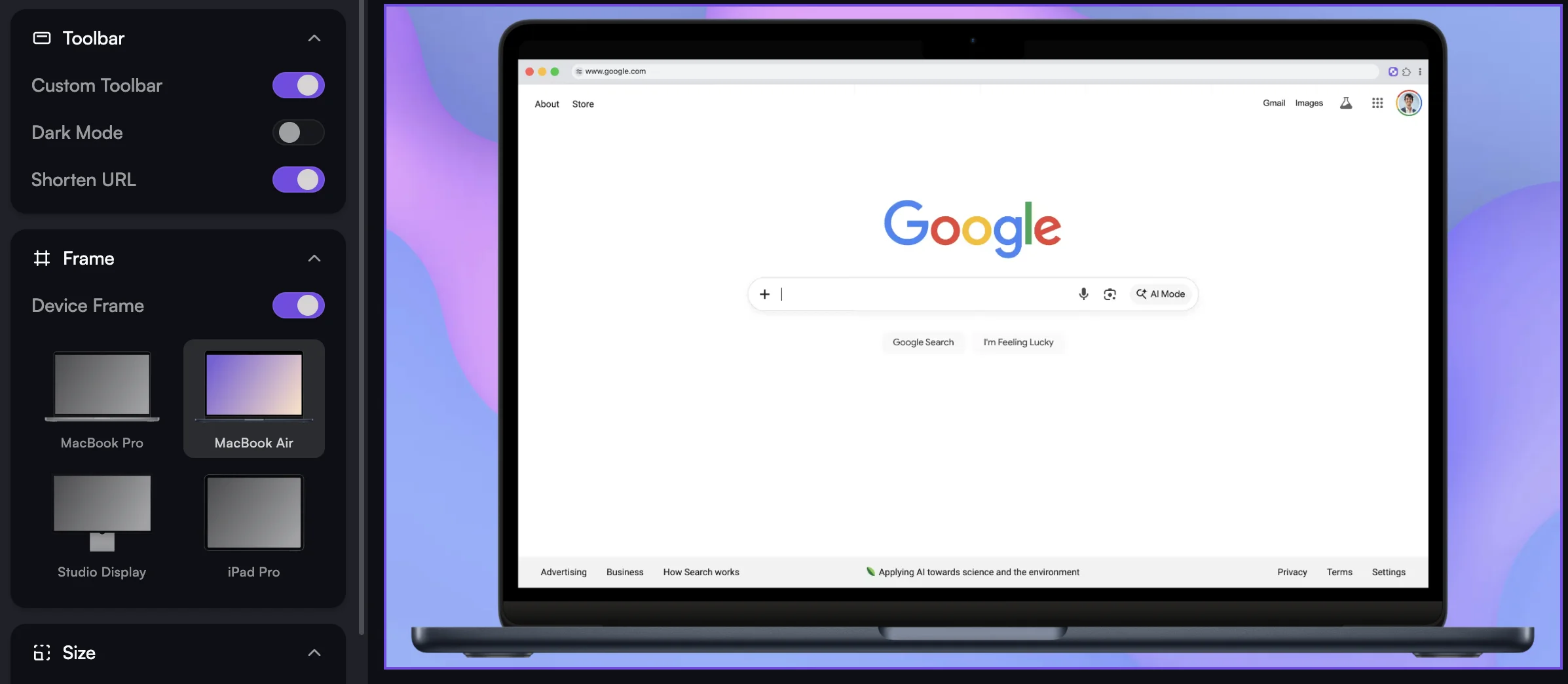
Recordio is the only screen recorder that lets you wrap your recording in a device frame, like a MacBook Pro or MacBook Air. Instead of exporting a flat screen capture, your video looks like it's being played on an actual device. It's a subtle touch that makes product demos and marketing videos look significantly more polished.
Smart AutoCut
AutoCut removes dead air from your recordings, but it's not just listening for silence. It also tracks your interactions with the app. If you're quiet but actively typing or clicking, it keeps that footage. It only cuts when there's both no voice and no interaction, i.e. the moments where you're probably thinking about what to say next.
This is meaningfully better than voice-only silence detection, which tends to cut moments where you're doing something important but not narrating it.
Simplified Chrome Toolbar
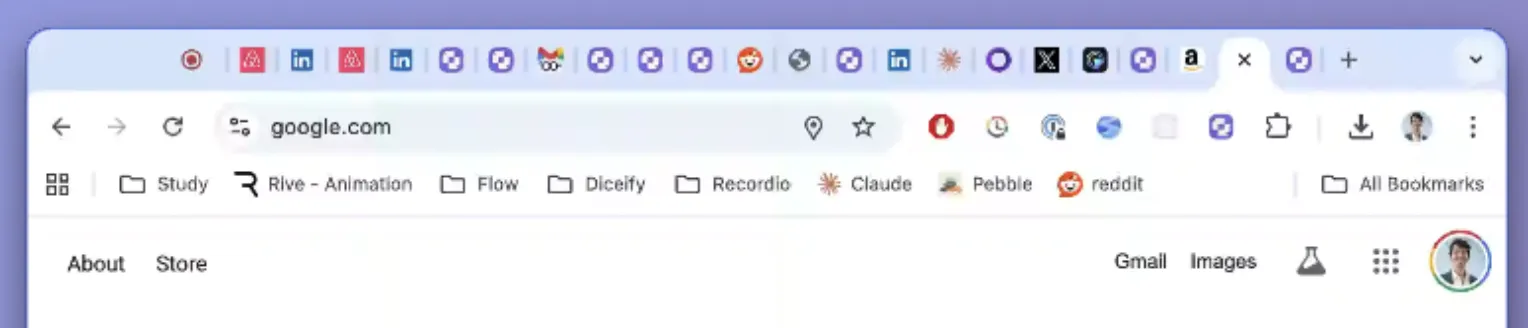
If you've ever recorded a Chrome window and cringed at your messy bookmark bar, 47 open tabs, and personal extensions visible in the toolbar, this feature is for you. Recordio replaces the real toolbar with a clean, simplified version that shows just the essentials. It can even shorten long URLs by stripping project IDs and query parameters, leaving a clean, professional-looking address bar.
 BEFORE
 AFTER
AFTERShareable Links with Viewership Analytics
Instead of exporting and sending files around, Recordio lets you share a link directly. Anyone with the link can watch your video without downloading anything or signing up. It goes further than basic sharing: you get viewership analytics like total view count and average watch time. If you've been using Loom for this, Recordio gives you the same sharing workflow with significantly better-looking output. Imagine Loom, but with studio-quality videos. Permissions (controlling who can view) are coming soon.
Other Notable Features
- Auto Shrink Webcam: Your webcam automatically shrinks when you zoom into content, so it doesn't block what you're showing. It restores to full size when the zoom ends.
- Dynamic Camera Placement: Set your webcam to full-screen for intros and outros, then have it automatically return to a corner position for the main content.
- Local Transcription in 99 Languages: The generated transcript is fully editable if the AI gets a word wrong.
- Word-by-Word Caption Highlighting: As captions appear on screen, individual words highlight in sync with your speech.
- Camera Feathering: A soft edge effect that blends your webcam into the background, so your face doesn't feel like it's pasted on top.
- Custom Backgrounds: Swap your recording background or upload your own.
- Cross-Platform by Default: Since it's a Chrome extension, it works everywhere Chrome does, with no macOS lock-in.
- Privacy-First, Local Processing: Both Recordio and Screen Studio process everything locally; your recordings never leave your machine during editing. What's notable about Recordio is that it achieves this entirely within the browser, with no native app install required. Transcription runs on-device via Whisper models. The only exception is shared links, where the final video is uploaded to our cloud (which we take security seriously on).
Where Recordio Falls Short
If you're recording native desktop apps (Figma desktop, Xcode, Final Cut), Recordio's auto-zoom and auto-spotlight won't work automatically since they rely on reading the browser DOM. You can still record these apps via screen/window capture and apply zooms and spotlights manually through the editor. Recordio's zoom and spotlight timelines are more intuitive than what Screen Studio and Focusee offer, and since you often end up manually editing their auto-zoom anyway (because cursor-based zoom rarely nails it), you might still save time with Recordio. That said, for pure desktop app recording, it's not the zero-effort experience you get with web apps.
Free to Try, No Strings Attached
Recordio offers a permanent free tier with unlimited 720p exports. On top of that, every new user gets a 7-day Pro trial, no credit card required. If you just need to make a one-off video, Recordio Pro is basically yours for free. We believe in building the best product and trusting that users will come back, which is why we offer the most generous trial in the space. Neither Screen Studio nor Focusee offer any free export option.
2. Screen Studio: The macOS Pioneer
Platforms: macOS only
Pricing: $9/mo billed annually ($108/yr) · $29/mo monthly · $209 one-time (1 year of updates)
Screen Studio was the first tool to popularize the "beautiful screen recording" category. It's been the dominant player in the macOS ecosystem for a couple of years, and for good reason: it produces great-looking recordings with smooth cursor-following zoom and solid background/wallpaper options.
Strengths
- Mature product: Screen Studio has had more time to polish edge cases and build a loyal user base.
- Full desktop capture: Because it's a native macOS app, it can record any app on your system with equal fidelity, not just browser tabs. Native apps can also access the camera at higher resolutions and frame rates, though this is rarely noticeable since the webcam ends up minimized in most recordings anyway.
- Motion blur and cursor smoothing: Screen Studio adds cinematic motion blur to transitions and smooths out cursor movements, which gives recordings a polished, professional feel.
Weaknesses
- macOS only: If you're on Windows or Linux, Screen Studio isn't an option.
- Cursor-based zoom only: It follows your mouse, which means it doesn't understand what you're interacting with. The zoom can feel imprecise, especially in dense UIs where multiple elements are close together.
- No auto-spotlight: No equivalent to Recordio's card elevation / 3D spotlight effect.
- More expensive: At $108/year, it's more than double Recordio's annual price. The monthly rate of $29 is nearly twice Recordio's $15/mo.
- No free tier: No way to try before you buy. There's no freemium export option.
- No viewership analytics: Shareable links exist, but no insight into who watched or how much.
- No simplified toolbar: You're stuck with whatever your browser chrome looks like.
- No device frames: No option to wrap your recording in a MacBook frame.
3. Focusee: The AI Avatar Bet
Platforms: Windows, macOS
Pricing: $49.99/yr standard · $79.99/yr advanced · $19.99/mo standard · $199.99 one-time (5 PCs)
Focusee is a cross-platform desktop app that borrows heavily from Screen Studio's editing model. Where it differentiates is its heavy investment in AI: AI-generated avatars, AI voice replacement, and AI-powered content creation. If you want to generate a talking-head video without actually recording yourself, Focusee is one of the few tools offering that.
That said, the AI approach has been controversial. Viewers can usually tell when a voice is synthetic or when an avatar is AI-generated, and engagement tends to drop. Authentic voice and face consistently outperform AI alternatives in product demos and tutorials. This isn't new; AI-generated content has been promising "just as good as real" for years, but audiences still prefer the real thing.
Beyond the AI features (which run on a credit system, so heavy use costs extra), Focusee offers the same cursor-based zoom as Screen Studio with no DOM awareness, no auto-spotlight, no device frames for desktop recordings, no toolbar simplification, and no free tier.
Pricing Comparison
| Recordio | Screen Studio | Focusee | |
|---|---|---|---|
| Monthly | $15/mo | $29/mo | $19.99/mo (without AI) |
| Annual | $48/yr ($4/mo) | $108/yr ($9/mo) | $49.99/yr (without AI) |
| Free Tier Exports | Yes (720p, watermark) | No | No |
| Shareable Links | Yes (with analytics) | Yes | Yes |
| Platforms | Chrome (any OS) | macOS only | Windows, macOS |
Feature Comparison
| Feature | Recordio | Screen Studio | Focusee |
|---|---|---|---|
| Auto Zoom | DOM + cursor based | Cursor-based | Cursor-based |
| Auto Zoom Editable | Yes | No (delete & redo) | No (delete & redo) |
| Auto Spotlight | Yes (3D elevation) | Dimming only | Dimming only |
| Device Frames | Yes | No | No |
| Smart AutoCut | Voice + interaction | Basic | No |
| Simplified Toolbar | Yes | No | No |
| Auto Captions | Yes | Yes | Yes |
| Webcam Auto Shrink | Yes | Yes | Yes |
| Dynamic Camera Positions | Yes | Yes | Yes |
| Captions Word Highlighting | Yes | Yes | No |
| Shareable Links | Yes, with viewership analytics | Yes | Yes |
| Music | Yes | Yes | No |
| Custom Backgrounds | Yes | Yes | Yes |
| AI Avatars | No | No | Yes |
The Bottom Line
If you record web apps (SaaS products, internal tools, dashboards, web-based workflows), Recordio is the clear winner. Its DOM-aware intelligence produces auto-zoom and auto-spotlight results that simply aren't possible with cursor-tracking tools. Add in device frames, smart AutoCut, and simplified toolbar, and you're looking at a screen recorder that was purpose-built for this use case, at roughly half the price of Screen Studio. And because it's web-based, Recordio is actively building toward a full Loom replacement, with library management, viewership analytics, and permissions: a direction that desktop-only tools simply aren't positioned for.
If you live entirely in the macOS native app ecosystem and rarely record browser content, Screen Studio remains a strong, mature choice. It's pricier, but it's proven.
If you want AI-generated avatars and voice replacement, Focusee is about the only option in this category. Just know that audiences still overwhelmingly prefer authentic recordings over synthetic ones.
For most people building, demoing, or documenting web-based products in 2026, Recordio is the best screen recorder you can get.